Network Stats
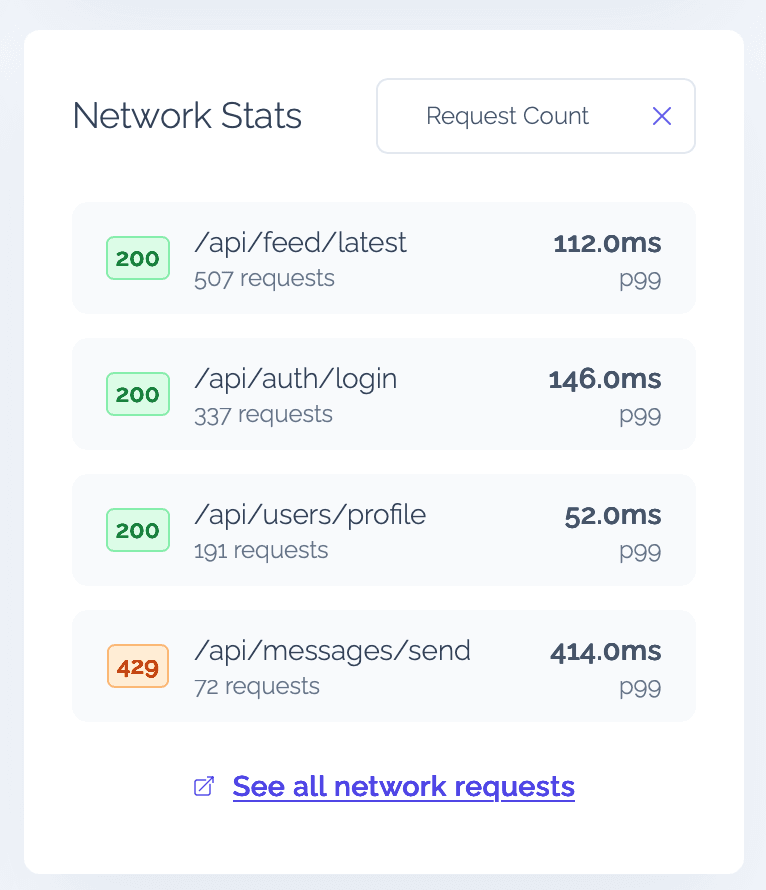
The Network Stats widget tracks all HTTP requests made by your app's users, giving you visibility into API performance and reliability directly from the dashboard.
How it works
Every time a user's device makes a network request, Vexo captures the route (URL), HTTP status code, request count, and latency. The widget groups these requests and displays them in a list, showing:
- Route — the API endpoint or URL path
- Status code — color-coded HTTP status
- Request count — total number of requests to that route
- Latency — response time (p99 by default)
What's captured
Vexo records your app's outbound HTTP requests. Two kinds of traffic are excluded so they don't clutter your data:
- Vexo's own analytics requests, matched by their host, so the SDK never reports on itself.
- React Native dev-server noise — the
/symbolicateand/logsendpoints, matched as exact paths.
Because the dev-server filter is anchored to those exact paths, your own requests to URLs that merely contain those words (for example /api/logs or /v1/symbolicate-batch) are still captured normally.
Sorting
You can sort the network stats by different criteria using the dropdown at the top of the widget:
- Request Count (default) — most called endpoints first
- Latency — slowest endpoints first
- Status Code — grouped by HTTP status code
This makes it easy to quickly find your most-used endpoints, identify slow routes, or spot failing APIs.
Filtering
The Network Stats widget respects all global dashboard filters — date range, country, OS, and app version. Apply filters at the top of the dashboard to narrow down network performance for specific user segments.
For example, filter by a specific country to check if API latency is higher in certain regions, or filter by app version to verify that a new release hasn't introduced regressions.